Just a couple of basics this week but sometimes it's the simple stuff that trips us up.
Q: I've downloaded photos from my email and I want to put them on a flash drive but they're a zip file. What do I do? I'm on a laptop running Windows 7.
Gadget Girl: Does the icon for the zip file look like folder with a zipper running through it? Erin: Yes.
Since you're using a Windows machine and the icon for the zip file is a yellow folder with a zipper running through it, it's actually pretty easy and you don't need a special application. Just double-click the file and it will open like a normal folder. Simply copy the files you want and then paste into a different folder or drive.
Q: I've setup a hotspot on my Android smart phone so I can use it to connect my laptop to the internet but I can't see the wireless network to connect to it. What could be wrong?
Ensure the phone is broadcasting its Service Set Identifier (SSID). That's the name you've given to the wireless network.
On my HTC One, it's on by default and in the advanced options is the ability to hide the SSID. Your phone may be different but just look for the setting where it talks about turning on or off the SSID broadcast, or hide or show SSID.
If the SSID isn't hidden, it may be that the wireless is off on your laptop: ensure that the wireless is enabled and check that there isn't an external hardware switch as well as within your operating system.
Today I'm covering one very consumer question and the other work-related...
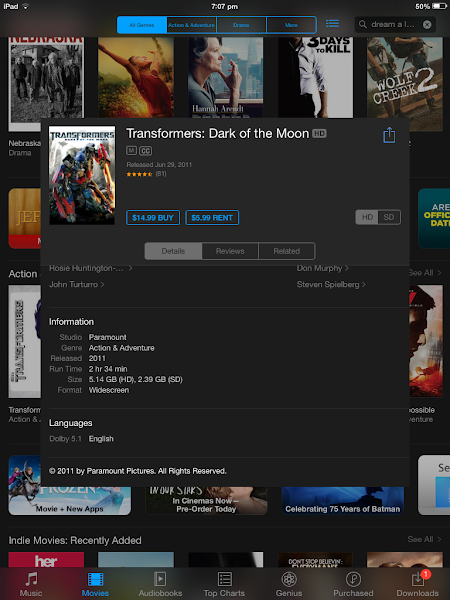
Q: I'm interested in buying a movie off iTunes - how much of my monthly internet quota will that use?
The amount of your quota used will depend on the movie and the quality you want. If you want to check, simply scroll down to the bottom of the movie details in the iTunes store and look for the 'Information' section. You'll see the available sizes listed there.
For some movies an HD (high definition) version will be available and this can be twice the size of SD (standard definition). If you're on a fairly low cap, you may need to compromise on the quality if you're purchasing or renting a few of these in any given month.
Remember too that you will use the same amount against your quota for every device you download to - for example if you're using both your iPhone and iPad or Mac.
Q: I need to put together some brand instructions for a vendor - how can I tell what fonts we already use on our website?
On Windows, in recent versions of the main browsers (Internet Explorer, Mozilla Firefox, Google Chrome and Opera) you can simply right-click on the text (or any other element) you're interested in and select 'Inspect Element'.
An area opens up with the source code for the page and another smaller area which tells you the specific styles applied. Look for 'font' and 'font-family' definitions. It will also show you the colour values and other information which you may want to pass on to your vendor.
Taking a break from those overly serious management-style posts to talk about some practical technology.
Q: are those backup external batteries really useful?
Yes absolutely — in combination with the right cables — a power bank in your satchel or handbag can be a very convenient back up power supply for your phone, mifi or other USB-powered/chargeable device. These days they are increasingly good value for money and can often be found in your local dollar store.
I don't use my power bank devices as a source of charging so much as additional battery capacity, often continuing to run my plugged in devices rather than switching off and charging the on-board battery.
This cute little block stays in my handbag and has been used when I've been out and about and needed to give my pocket wifi a boost. So far I've not managed to drain it but have had more than two hours of additional wifi. This particular one I found at my local "123 Shop" for $8.90NZD.
Q: Is retina display worth the extra money on the iPad Mini?
My advice with any hardware purchase is to get the best you can afford at the time of purchase: whether that's in amount of disk space or the quality of the display. But in the real world we sometimes have to make a call about which features are most important to us. Whether you want to spend $149NZD to upgrade the display to retina or $199NZD to get cellular it's about what gives you best value.
My iPad Mini doesn't have retina display but that's only because I was an early adopter and retina wasn't available when I purchased. My eyes have had Lasik surgery so I consider that it's worth it for me to spend $150 to get a better display but harder to justify spending $599NZD to replace my current device especially as I have a retina display iPad generation 3.
It's been a few weeks since the last Q&A. I've had a number of questions in the meanwhile but in anticipation of a dry spell I'm metering them!
Q: we only have printed copies of our logo. How can we track down the font used?
Next time you have some interesting typography and want to track down the font, take a snap and load the picture to the WhatTheFont service: http://www.myfonts.com/WhatTheFont/
You will be prompted to ratify or correct its character matching before it gives you a report of potential matches.
If you're a real typophile you can also download the app for your iOS or Android device.
Q: sometimes I go into the email on my Android phone and I can't find my work Exchange emails: what's happening?
On most Android devices you'll find two email programmes, the default Android mail programme (Mail) and the Gmail app. The Gmail app uses any Google accounts loaded on the device and displays only those mailboxes, whereas the Mail app allows you to configure non-Gmail accounts.
If you're only operating Google emails that's not too much of a problem, however if you're using Exchange, Yahoo or another mail provider you'll want to ensure that you're selecting the correct app.
My goodness, hasn't the week flown by! I am working on a number of articles in the background but they're not quite ready so I'm glad there is an opportunity to share some techie goodness in this column.
This week I caution that the Curl Secret is designed for medium to long hair, talk about the mechanics of iPhone call recording and why that's not as easy as it sounds, pin down the right running app for a specific distance, and talk about work-related stuff.
Caitlin: Riddle me this Gadget Girl... I need an app which can track my 2.4km runs. Nike+ can only do 2.5km.
Gadget Girl: Are you meaning one where you can set a specific target distance? Caitlin: Yes please
Damn about Nike's Running app (also available on Android) being restricted to distance runs at half kilometre intervals. Up to now it's been my favourite run tracker app, giving comprehensive statistics, allowing me track what surface I ran on, where I ran, speed variations, shoes, etc... It even has preset training plans for 5km, half and full marathons. And yes it can allow for free, time and distance runs.
Unfortunately, Cait's needs are quite specific down to the 100m.
I duly checked out my other running apps: miCoach, SportsTracker... Moved on to the App Store for the official C25K app, RunKeeper, MapMyRun. Unfortunately, whilst some have distance runs, they had a similar level of granularity as the Nike option. Others you could set 2.4 kilometres but only if you loaded a route set at that distance.
After a fifteen minute trawl and download frenzy, I finally found Run Tracker Pro by Bluefin Software, who make a number of exercise-related applications. This baby has many similar features to the Nike app. It also has interval training functions and lets you set a distance run down to 100m granularity. Unlike many of the other options, it isn't free and at $3.79 NZD it's in the middling zone of pricing but it does meet the requirements and having bought it to take a gander, I like it's user interface and will give it a try myself.
Becca: have you ever tried the Curl Secret?
Actually I own and have tried Vidal Sassoon's Curl Secret. It's a nifty wee device where you take locks of your hair, insert it into a groove in the barrel of the device and it winds your hair in after you squeeze the handle shut. I've only had it a few weeks but I liked it from the first go. It has a couple of heat settings and you can select 8 or 12 seconds depending what level of curl definition you want.
The device is definitely one where practice is required and until I've had a few more goes, I won't be attending any events with the results of my self-styled hair. That being said, the resulting curls are different from what I can achieve with my straightener, traditional curler or InStyler. Given the size of the barrel, however it's definitely better on medium to long hair otherwise there's not much for it to wind. They recommend a minimum of 15cm length.
I've loaned the device out for someone to try otherwise I'd make a video where I'm not looking so embarrassingly bloated and tired however, my vanity aside, this 24 second snippet I recorded for my friends, taken the day I bought the device, shows how easy it is even for a novice to pick up. Otherwise see the official how-to video on YouTube for the pretty model, made up and skilled enough to make it look damned easy!
Tash: Hey Gadget Girl, will AudioNote work if I'm actually on a phone call with someone?
Gadget Girl: Hmmm... Will you be on a speakerphone or are you intending to record the phone call whilst you're on the actual phone? Tash: I'm planning on recording the conversation while on the call.
Unfortunately the iPhone will only allow one app to take control of the audio devices at a time - i.e. only one app can use the microphone, only one can use the speakers so technically AudioNote can use the mic whilst Music Player is using the speakers but a phone call requires both the mic and the speaker. This method won't work if you're using the same device to record and call and I did run this whole thing through some testing.
I've never looked at call recording options until now, but there are some options on the App Store such as TapeACall. These use the 3-way calling merge function that comes native to the phone. I have previously enabled multiparty calls on my Vodafone number and tested it so it's certainly possible to achieve this in New Zealand, so long as you're comfortable with someone else being in on your call and storing your recordings for you. Other options, such as Call Recorder - IntCall, channel your call through a VoIP service so you're not actually using your native functionality per se.
As I understand it, we have no laws prohibiting or controlling the behaviours related to recording phone conversations in New Zealand so long as you are a party to the call (otherwise it's illegal). This is not the case everywhere. If you're looking for a call recording solution, you may want to consider one which has the interval beep function as an option in case you interview someone overseas from a country where they are more comfortable with and expect the beep reminder.
Rebecca: what do I need to consider now that we're sourcing and providing data between various parties for my project at work?
This was a work-related question, but one I thought I'd share more widely. When you're dealing with information, be it data or documents, capturing the metadata (information about that data) is important. This is everything from where it comes from, what it's license status is, where it's stored to the format it is in. You don't want to get a few weeks or months into your project and have to wade through your emails to find this information out; nor to be scratching your head as to what you've already got. Keep it in a single register or catalogue, fit for the amount of information you have to track: a spreadsheet or Access — *groans because she can't believe she wrote that* — database at its most basic, some inventory app, large-scale database or specialist software at its more mature.
The thing to remember is not to make this up from scratch. No matter what you intend to store your catalogue in or what you call the fields, there is prior work you should reference. And that prior work is Dublin Core - the international standard for metadata. If you work in Australia, also refer to the extensions to Dublin Core found in the Australian Government Locator Service (AGLS) and in New Zealand, the NZ Government Locator Service (NZGLS). By using existing standards, multiple parties in differing contexts will at least be speaking the same language.
I get asked a number of tech and gadget-related questions quite frequently. Instead of waiting to write up a full article to share the answers with the rest of you, I thought I'd share at least the highlights in a regular mid-week column.
This week we step beyond dictaphones, and take a look at fitness trackers, expense claims, and wireless multimedia.
Tash: has anyone used a voice recording app to record interviews on their iPhone?
For an interview I would use Audionote. Very much worth the money for this paid app. You can write notes at markers in the synced audio which makes tracking through a long interview or meeting much easier and more efficient. A few of my colleagues won't take meeting minutes any other way.
Given I'm into using technology to be more efficient and effective, I'd recommend upgrading our smart devices to be better than old tech. This method of tagging whilst recording is a step beyond using your device as an expensive dictaphone. This is pretty nifty for students recording lectures too.
The iOS version pictured allows not only text but also sketches, highlighting and photographs. Handy if you want to snap a pic of something being talked about and have it associate with that particular segment of the recording.
Rebecca: have you ever used a fitness tracker and which ones are good?
Yes, I've tried using the Fitbit Zip and even managed to write up a little about it. Even if you're considering a more fully-featured device, it's worth seeing if you are the kind of person who would remember and be disciplined or motivated enough to actually use one of these. You can do this with a monitor-less app approach: the Fitbit app and MyFitnessPal are both available free and can be used without a tracker. If and when you get a tracker they integrate nicely.
I'd recommend trying something small like the Zip before investing a lot more money on functions which may be beyond your real requirements. Even better if you have a friend who's finished using theirs and doesn't mind loaning it for a trial.
Julian: do you have an app you use for receipts/expense claims?
Since my consultancy migrated to Xero, we've been using the expense claim function on the smartphone app. It's simple, allows immediate coding of expenses and it's an easy snap and attach for photos of the receipts. Of course it requires having a Xero account for every person who will be claiming expenses in this fashion.
If you don't use Xero or someone's only occasionally going to be claiming expenses, then take a gander at iExpensesClaim by Nicholas Thenoz for iOS. For $1.29NZD you get an app that allows you to snap and classify expenses than export to Excel and/or PDF for submitting. We used this app before we migrated to SaaS for our accounting software.
Dan: had any experience with HDMI/wifi dongles? I haven't used one myself but I have heard good things.
I've trialed AirPlay, Miracast, Android Mini PC and a wifi video receiver all for various purposes from streaming multimedia to full-on device mirroring. They all have their pros and cons but definitely nothing yet has shouted "I'm really, truly great for wireless hi-def audiovisual".
Have yet to try anything which has an HDMI transmitter off an HDMI output sending to a paired HDMI receiver on an HDMI input. But would love to.
I've been working on getting back to my usual weight range and generally improving my level of fitness. Whereas my attempt to gain weight a couple of years ago entailed eating like a horse and playing couch potato, dropping the weight gained is taking a little more concentrated effort, particularly as my usually fast metabolism needs to be kicked back into action.
To help me along, I've been using one of the Fitbit products, the Zip. This wee device, which you attach to your clothing, preferably close to the skin, monitors your steps/movement to assess your level of activity and therefore give you an up-to-date picture of the calories you're burning.
Whilst there are more sophisticated Fitbit and similar monitoring tools, I have found the Zip, in conjunction with the Fitbit application to be useful; and more than just a fancy pedometer. The data logged by the Zip is assessed by the companion application for 'active minutes'. The more active you are, the more it adjusts the calorie intake you need to make it through your day and still meet your weight loss, gain or maintenance goals.
I had already been warned by one of my friends about the impact of more active days when your calorie intake is low. As a school teacher, days at school are far more active than weekends and holidays and by sticking to the lower calorie threshold set by her diet, she ended up fainting a couple of times at work. She subsequently adjusted her intake to compensate and has continued to make excellent progress towards her health goals.
Where a device like the Zip is useful is actually reducing the guesswork about how much additional energy you need on those busy days, as well as when you should do an extra ten minutes on the exercycle for having had a more sedentary day playing computer games.
My use of the Fitbit app and the Zip has matured to include the use of the compatible MyFitnessPal app. This isn't a review of either application (a job for another day), but more a comment on how these automated logging tools can help you monitor and reach your goals.
Having found the value in this small piece of tech, I'm keen to upgrade to a device that tracks a little more. There are fitness monitors capable of tracking heart-rate and sleep, for example. Sleep being an important health factor for me, such a device would be useful for management of my physical and mental health.
Fitbit Zip is available at a wide variety of retailers for $99.95 NZD. Both the Fitbit (iOS, Android, Windows desktop, website) and MyFitnessPal (iOS, Android, Windows Phone, website) apps are free and can be used without a tracking device.
We're midway through January and I wouldn't be surprised if a few of us haven't struggled with those New Year resolutions. I'm not so much into resolutions, but I need to ensure I have good habits in place either to support some longer-term goals or simply maintain a healthy lifestyle.
One of my favourite range of apps are the Weple ones produced by Bumblebee for iOS. And for the last couple of months I've been using Weple Habit. Habit is one of the more recent additions by Bumblebee and it's a very simple app. You create tasks, assign a date range, pick the days of the week they occur, choose an icon and colour for each. Once they're in you simply click the corresponding dot each day to denote tasks which you have completed.
There are far more complex and fully featured apps that do similar things out there and, even by Gadget Girl's normal app selection criteria, this is nowhere near the best - no device sync, no multiplatform options - but so far it's the best for me. The reason? It's so simple: I go in around bedtime everyday tap, tap, tap and done. As with all Bumblebee's products it's pretty; and if you have to look at something everyday that's actually an important facet of the user experience.
Given I've used it successfully everyday for 48 days now, I think it's been worth the $0.99USD price tag.
Mx5Pixie - also known as Mia Morrish - is an IT consultant by day and sporadic but prolific blogger by night. To share her interests with the world at large (or at least anyone who can be bothered to read her ravings) she writes and photographs about fashion and style, travel, lifestyle, technology, bees, food, society and poetry.
When not spinning out hundreds of words per day, Mia likes to dance, read, watch an eclectic range of TV and movies, enjoys different types of exercise including all forms of dancing, yoga, combat and the gym. She occasionally pulls out her weapons to practice in the backyard and menace the plants with her swords. She also loves gaming but has to squeeze that into her busy schedule. At least dancing on the Kinect counts as exercise!
 Gadget Girl: Does the icon for the zip file look like folder with a zipper running through it?
 Ensure the phone is broadcasting its Service Set Identifier (SSID). That's the name you've given to the wireless network.