Tuesday, 6 October 2020

Virtually fit

In one of life’s odd coincidences, I happened to be watching the news last night when they featured FitXR - a game development start-up co-founded by kiwi Sam Cole. The pandemic lockdowns have boosted the company’s user base as people attempt to stay fit from the safety of home. FitXR is the virtual fitness game I’d been using while on holiday and I was all set to write this when they came up on the news.

Full disclosure, I still think the XBox Kinect is a better overall experience than the Oculus Quest if you’re using gamification for fitness but where the Quest really comes into its own is the portability.
I was tossing up whether to take the Quest with me on our roadtrip holiday last week when my other half said “we’re driving so there’s plenty of space: just throw it in.” So I grabbed its carry case and added it to the pile. I ended up using it twice a day - my intentions to walk a lot fell pray to the weather - and really sampled FitXR as a result. 

What was transformative, however, wasn’t that I used it as a convenient travel fitness option; it’s that since the holiday’s been over, it’s been re-homed to the gym where I have used it as part of my day-to-day fitness regime. It’s just so convenient to pop it on, grab the controllers and choose a class of appropriate length either to serve as warm-up or the day’s exercise. The Quest has really made a positive impact to my day-to-day.

FitXR

FitXR is a boxing game: you hit the lights as they reach you with a combination of jab, cross, hook and uppercuts. You can add squats as an option which allows for some lower body workout and decide whether you want to do classes solo or with other players from around the world. Since I’m competitive, having classes with other people really incites me to punch fast. 

Pros

  • Very portable: you can purchase a travel case for the Oculus Quest so it’s easy to grab and go.
  • A good workout: even if you choose a light intensity, 3 minute class, you will work up a sweat and feel muscle fatigue.
  • Can work by yourself or in a class setting. I really enjoy both options and it’s cool to look around and “see” your classmates punching and squatting with you.
  • Can do anywhere you have space to punch and step for the side squats so even a hotel room would do and you don’t need to plug in to anything so long as the battery is charged.

Cons

  • Scoring is based on a combination of accuracy in hitting the ball and the speed of the punch. Whilst this is good for encouraging you to use your hips as you’re meant to in boxing, I did find my form getting lax in the pursuit of enough speed. The Kinect’s form correction capability is much better in this regard.
  • My muscle memory places my guard up - years of practice to come back to guard - and I find myself banging the controllers against the VR unit.
  • You can quickly become uncomfortable - the sweat builds up on both the visor and the controllers. Half-an-hour or so tends to be my limit.
  • Goggle-face: my other half tells me I look like I’ve been swimming with deep impressions of the VR unit on red, sweaty face that takes about half-an-hour to fade.

Labels: , , , ,

Tuesday, 15 September 2020

Adapting

As with many households around the world we've had to up our work from home game. For my other half this means his own workspace in a separate room to ensure we can both attend meetings without annoying each other. The changes wrought by the pandemic actually coincide with my return to independent consulting after a couple of years doing the Big 4 thing and a need to reinstate a fully working office capable of supporting my management and technology consulting practice as well as my blogging, photography and other creative pursuits.

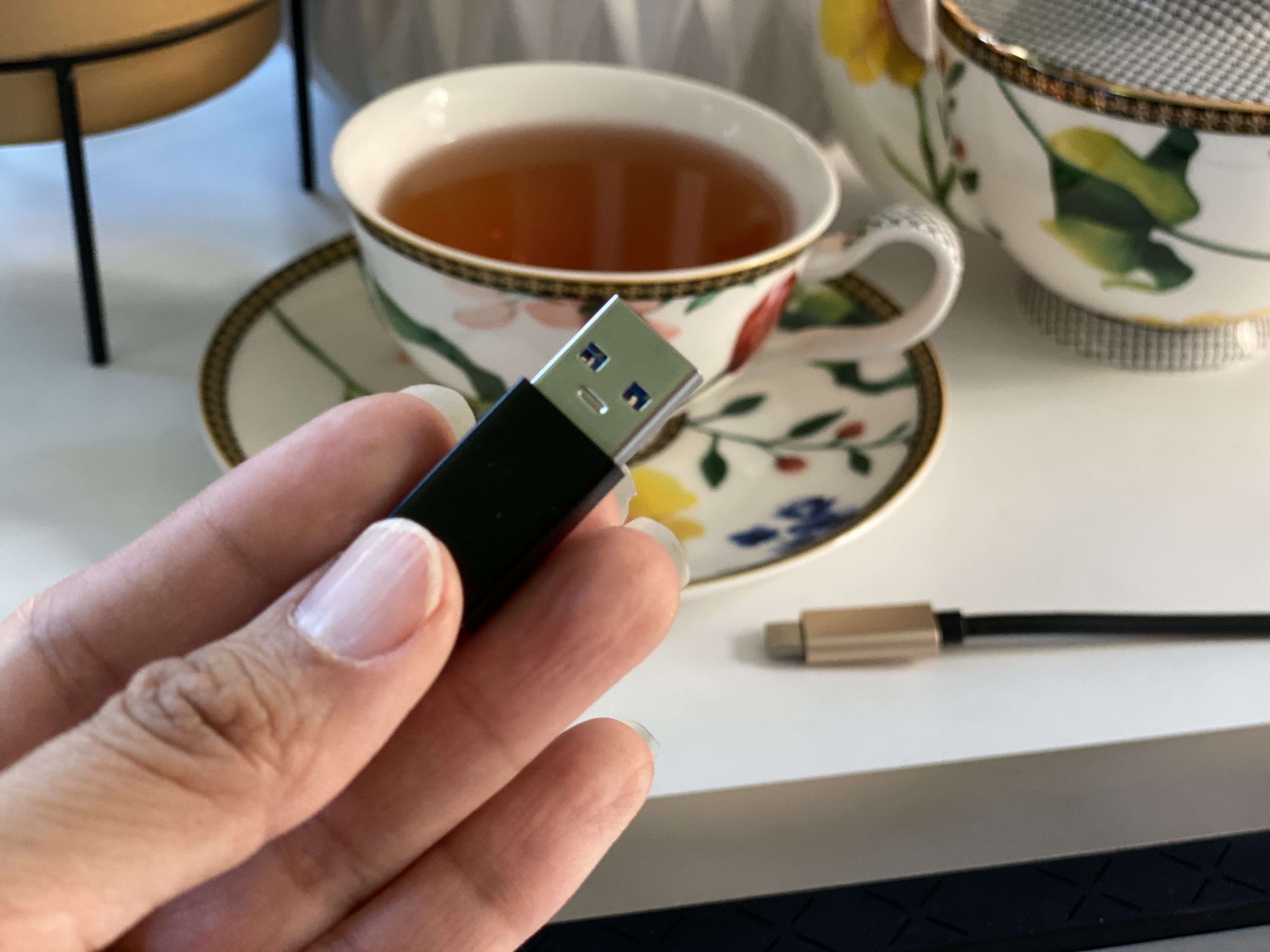
One of the things that has come up is the need for a more modern docking station capable of supporting 4k display and a plethora of accessories. My choice of dock is a musing for another day but what really gave me pause as I looked at the different options was how future-proofed I wanted the purchase to be. Everything is moving to USB-C but I use multiple laptops and some of them don't have a USB-C port. I was facing the need to retire perfectly capable computers or buying a dock I may need to upgrade sooner than desirable.

I decided instead that I would try one of the USB-C to USB-A adapters before I took the plunge because for NZ$7.95 I could well have the best of both worlds. The adapter arrived within a couple of days of purchase from TradeMe and was immediately tested. The first attempt didn't work but the supplier had helpfully noted on the product description that the USB-C male connector inserted one way was USB 2.0 and flipped over was USB 3.0. I duly flipped the USB-C connector and lo and behold the USB-C dock I'd borrowed from my partner installed. Mice, keyboard and dual monitors all working! 

If, like myself, you are in a transition with your tech then this could be a useful widget to have. We now have a few of these so that my partner's matching laptop to mine (without the USB-C port) can still use his docking station.

Labels: , ,

Monday, 6 February 2017

Telling time

Nelson Mandela: http://ti.me/2liBhXG 
Some stories have a strong element of time to them: someone’s life, a series of events. A timeline is often a wholly appropriate method for describing what has or will happen.

A client recently wanted to use exactly this method of storytelling to share the peaks and troughs of activities covering a period of just over 5 years. They wanted to be able to give a rich experience of photographs and videos from that time and to provide links to useful resources.

In helping them find a solution to their requirements we explored both the possibility of building from scratch or an off-the-shelf solution. I was most impressed with an open source project I found, TimelineJS.

Knight Lab, stemming from Northwestern University, is a cross-discipline collaboration best known for delivering a suite of tools for media makers. TimelineJS is one of their mature products - already on version 3 - and is widely used by respected news outlets such as Time Magazine, CNN and Le Monde.

Revolutionary Interfaces: http://bit.ly/2kfPS56
Whilst there are other tools available, some for a subscription fee, I found TimelineJS to be very elegantly designed and developed and all for free! It is highly customisable and - depending on your technical and security requirements - can be used in hosted mode, embedded into your own webpages or downloaded and hosted on your own infrastructure. Customisations can be made to styling and functionality: so if you’re a little more technical (or have access to developers) you can make beautiful timelines that adhere to your branding guidelines.

This kind of tool can be so useful for public communication, journalism, and education.

Check out TimelineJS: https://timeline.knightlab.com/


Timeline JS3 - Beautifully crafted timelines that are easy, and intuitive to use.

Labels: , , , , ,

Sunday, 29 January 2017

Immortal views

In the dark ages - my late teens - I read a book by Dragonlance writer, Tracy Hickman. The Immortals, published in 1996, is a near future science fiction wrapped around the concept that a counter-virus to HIV ravages the population creating a dystopian America that incarcerates the infected in concentration camps primarily targeting the homosexual population. The underlying message that stuck with me however, isn’t so much the science - how the cure becomes worse than the disease - nor our societal bigotry exemplified by the poor treatment of the LGBT population. The part of the story that stuck with me is how the expanding communication options available to us actually lead to an even narrower and more propaganda-driven world view.

If you read my other commentary posts you’ll know that I view technology as a tool like any other and that it is neither inherently good nor evil.

I love how social networks enable us to keep in touch in a modern reality where family, friends and colleagues can be dispersed across timezones. I appreciate the ability to photograph, write and build and then to share my thoughts and creativity in a matter seconds to others who appreciate the same things I do. I host a number of digital groups formed around the trivial - Konmari, fitness, family news - and the professional where we share job opportunities and debate various sector-related topics.

In all this I am still acutely aware that, as Tracy Hickman cautioned in his fiction, we can choose to only expose ourselves to material which aligns with our existing world views and intolerance. As readily as I can find #inspo photos to help me organise my cupboards better, I can find content that adds fodder to bias and discrimination. I don’t even have to look any further than the comments on Facebook. Our digital world enables trolls to run anonymous and unchecked through our world spreading misinformation faster than an airborne virus infects.

The main character in the books says “You can have everyone in the country vote freely and democratically and still come up with the wrong answer - if the information they base that decision on is wrong.” This statement feels all too true at the moment. He goes on to say, “We told them ... that any problem - no matter how complex - could be stated clearly in a five minute news segment; that any discussion of issues could be made clear in a ten-second sound bite."

Forget 10 second sound bites: today we summarise key information in infographics, debate in 140 characters or less, and highlight the important with a hashtag.

My belief is that we are each responsible for how we use the tools at our disposal. We can use communications technology for healthy debate, to share ideas so we can continuously improve, or to pool resources to solve problems and provide support. Or was can use it to reinforce our existing perspectives without ever looking at the other side, we can engage in Twitter wars on the frivolous, or use it to bully people safe from physical retribution an ocean away.

The Immortals is set in 2020. When I was nineteen that seemed like such a long time away but now it’s only around the corner. I had hoped that if I ever reached my forties discrimination - gender, age, sexual orientation, race - would be less prevalent. I hoped that Hickman spun a good - if somewhat dark - yarn but wasn’t really prescient. Now, I worry that maybe he was on the point.

Labels: ,

Wednesday, 25 January 2017

Story time

For more than a decade now my main form of recreational reading has been fanfiction. If you're not already familiar with this form of derivative writing then check out the millions of creative works available on fanfiction.net, archiveofourown.org and livejournal.com. Among the appealing things about this form of escapism is that I can find a plethora of fiction from short one shots to multi-chapter, multi-story saga: length to suit the available downtime and the mood.

Unlike traditional novels, however, when the story you're reading ends you can simply go on to another so if you’re on a roll it can become a bit obsessive. Next thing you know your entire weekend has been curled around the iPad and the dishes aren’t washed and pile of laundry that needs folding has taken over the couch!

I have found a workaround to keeping up with my menial chores and getting through thousands of Harry Potter and GoT fanfic: turning my iPhone, iPod and iPad (whichever is closest to hand) into audiobooks using the in-built screen reader accessibility tool.

There are plenty of “did you know” articles that let you know this trick about turning your iBooks library into audiobooks but what I like about iOS is that any text content even within an app can be read aloud. This means you’re not restricted to iBooks or Kindle: any website content - regardless of whether you use Safari - can be turned into an audiobook too!

So if you tend towards higher brow reading than my (not so) closet addiction to fiction marked with a variety of warnings and filled with crack ‘ships, you can happily use exactly this method for getting through the latest journal article or RSS feed that you’ve subscribed to.

To turn on this feature:

  • Go to Settings > General > Accessibility > Speech
  • Turn on “Speak Screen” (my preferred method) AND/OR
  • Speak Selection

If you elected to use Speak Screen (which is my preferred method), all you have to do when you want something read is to two-finger swipe from the top of the screen. The Speak Selection requires that you select the specific content you want read and then choose the “Speak” option from the pop-up context menu.

For those who use Android

The screen reading functionality is not as integrated as it is in iOS. You can manage the settings within Android but will need to choose from the variety of screen reader or text to speech app options to actually carry out the reading.

For those who use Windows Phone

There is a “narrator” function that you can turn on however, it is restricted to a few language packs. I had to add English (United States) to my phone because narrator won’t run with English (New Zealand). To enable narrator:

  • Go to Settings > Ease of Access
  • Slide the Narrator option to on
  • Slide Narrator Quick Launch to on

I warn however that using narrator is horrid and clunky and requires some dexterity to turn on and off.

So, next time you see me taking a stroll to the supermarket or the post office with headphones on, it’s just as likely that I’m listening to the latest chapter from an Olivieblake, Colubrina or Midnightjen fic as it is my current music playlist.

Labels: , , ,

Saturday, 16 July 2016

Home gym upgrade

One of my personal projects during this sabbatical from my usual contract work has been to set up a small gym at home. With exception of a ballet barre, the gym is now complete and today's efforts focused on the technology aspects.

I enjoy a variety of fitness activities from weights and resistance band strength to yoga for flexibility and a wide variety of dance forms and combat for cardio. So it’s important that the “gym” isn’t simply equipped with dumbbells and kettlebells, it also has to have a television for my virtual classes.

The space is small so the TV had to be compact: mountable with no need to have large external devices, such as separate DVD player. I was averse to spending a lot money for equipment with a very narrow usage so despite my partner’s suggestion of purchasing a fully-featured smart TV and not simply getting the cheapest available, I held firm and chose something with reasonable definition, good colour, USB reader, plenty of HDMI ports and built in Freeview and DVD player without requiring a name brand or smart applications.

The Veon 32” high definition LED television met my requirements for size, functionality and cost. A TV mount keeps it flat to the wall when not in use or when watching from the exercycle but swings out for better viewing angle when doing “class”.

The in-built USB and DVD player takes care of a number of “classes” but I also want to use my Les Mills On Demand subscription and the apps available for smart devices such as the Johnson and Johnson’s 7 Minute Workout. A few years ago I’d purchased an Android Mini PC and today it was booted up for the first time in months. As the main television in the house is a Samsung UHD smart TV, it's no loss for the mini PC to be plugged into the gym television on an on-going basis.

I was super excited to plug it all in today and test everything.

Unfortunately the Les Mills On Demand app installed but crashed when opened. The Johnson’s app installed and opened but despite the functionality working as expected, the videos didn’t appear. I expect a little more debugging may solve the problem (I tested straight after installation and wonder if the videos hadn’t fully downloaded locally).

I was, however able to play the On Demand videos using the browser and the Mini PC’s wifi worked a treat even with distance from the router. A bluetooth mini keyboard enables me to operate it from anywhere in the room.

Setup:
  • Veon 32” high definition LED television with DVD player: $299 NZD
  • Ofa 13-32” TV mount: $59.99 NZD
  • Android mini PC: $69.90 USD
  • Bluetooth mini keyboard: $38.30 USD
  • Les Mills On Demand subscription: $19.95 NZD monthly (requires a Les Mills gym membership if in New Zealand)
  • Johnson and Johnson’s 7 Minute Workout: free
I firmly believe that having good equipment and appropriate spaces for various activities enhances both the experience and effectiveness. I love going into "my gym", turning on some sounds on the bluetooth speaker dock that's in there and doing a quick workout with the weights and other equipment. Now that there's some video as well as audio, I'm certain I'll enjoy some dancing, punching, kicking and sun salutations too.

Labels: , , , , , ,

Tuesday, 5 July 2016

Size matters

There’s a difference between 240 and 150. Dealing with 2000 items is less of a hassle than 55,000. Squeezing fifteen people into a room is harder than five. What am I saying? Size matters. Volume matters. Scale matters.

Knowing the size and shape of a thing is so fundamental it’s one of the first things we learn as children.

Whether it’s for a piece of work I’m about to tackle or a project I’ve been asked to review, how many things we have to deal with and their status is the first question I ask, not the methodology, not who is on the team or even how big the budget it is. All those things can only be assessed for their fit once the composition and size of the problem or task is known.

I’ve worked in the ICT industry for nearly twenty years: more than fifteen years as a project manager on a wide range of projects all with unique combinations of complexity, technologies, teams and politics. For a large number I’ve been called in because they need correction and what often leaves me aghast on lifting the lid is the number of times that the volume of change hasn’t been properly assessed.

Recently, I worked with a client to transfer all its records - stored in an electronic documents and records management system (EDRMS) - to other agencies. In five years of operation, this client agency had amassed nearly 900,000 documents each with an unlimited number of versions. One record we exported had around 200 versions of the same very large Excel document. Consequently, an export of a section of the file plan took many hours. Add to that process the manual audit check and an overnight encrypted copy of files for secure transport and it could take several days to get to the point where one agency passed the files to another. Then add at least the same amount of time for the receiver to import the files.

It’s not surprising that a request to transfer wasn’t something that could happen in the twinkling of an eye. What frustrated me was trying to make non-technical personnel and governance groups understand that the reason we could not complete all the transfers in the time given wasn’t a technical issue but a case of simple maths. There was really no reason for the typical “this is technology I don’t get it” response.

The same factors have existed for many web content migrations I have worked with. Particularly when it’s not a simple transposition of structure and content - and therefore automation is limited or infeasible - the human element comes into play. I know that a blog post or article will take me anywhere from forty-five to ninety minutes for a first draft. A business memo of around a page and a half will take forty-five minutes to an hour. So it’s reasonably easy to know that even a modest 100 page website requires seventy-five to 150 man hours to get through the drafting process alone, so long as everyone writes at my pace.

A restructure, rewrite and approval process for a redevelopment of most reasonably mature websites will take months even with multiple writers and migration personnel all working. Throughout the process, a frequent check of velocity is needed: x number at draft; y number at review; and z number at approved. Again: when the process will complete is a calculation and arbitrary deadlines will merely result in higher costs or poor quality.

Even if the project is a simple desktop deployment or an application development we are still prey to the numbers. How often is the time it will take to develop a piece of functionality not properly estimated? How often is the time taken to unpack 100 monitors from their boxes and plugging it all in not considered when a team is given only a day to roll out into an office? It happens often: far more than you would think.

In the physical world, we would never start building a high-rise without understanding how deep the foundations must go, how much concrete, steel and glass is required. Yet, it seems AOK to proceed with technology projects without quantity surveying.

Unfortunately, whilst all this seems to be very simple to understand, all too often I encounter project managers who can’t tell me how many items they are wrangling to deliver the project. They can’t articulate all the steps of the process and how long each is estimated to take. How are they surprised then that they are nowhere near finished?

My advice to customers, stakeholders, and governance groups is to test your project team’s knowledge of the volume. Test their understanding of the time it will actually take to get the job done: ensure they recalculate based on actual experience. Basic calculation can save a lot of stress.

It's not complicated; it doesn’t take a great deal of technical knowledge… After all it’s child’s play.

Labels: , , ,